Posts

Showing posts with the label WordPress -Advantage

Difference between a Session and a Cookie?

Image
A session is a global variable stored on the server side. Each session is assigned a unique id which is used to retrieve a  stored values. Ex-First start session <?php session_start(); $_SESSION["name"]=$_POST["username"]; ?> • Sessions have the volume to store comparatively large data compared to cookies. The session values are automatically deleted when the browser is closed then session is expired. • Session data is stored on the server side, whereas cookies store data in the visitor's browser side. • Sessions are more secure than cookies as it is stored in server. Cookie can be turn off from browser. Ex- Cookie start with Syntax: setcookie(name, value, expire, path, domain);  <?php $xyz=time()-60*60*24*30; //  Sec*Mint*Hours*Day setcookie("Mohit"," Bca 1st Year",$xyz); echo $_COOKIE['Mohit']; print_r($_COOKIE); ?> Session: Session variables stored information about one single user, and...
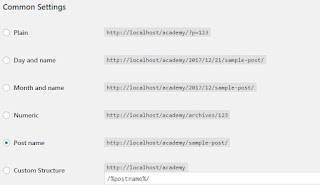
What is Permalinks How to Reset permalinks ?

Image
What is Permalinks? Permalinks are the permanent site URLs to your person pages ,blog posts and product category , as well as your category and tag archives. A permalink/url  is the web address used to link to your content and post/pages. Resetting permalinks rebuilds your link structure for WordPress. regularly, this process must be performed after migrating a WordPress website, or when troubleshooting 404 errrors. This is accompished by choosing a different permalinks setting, and saving it. Then putting the permalink setting back to the original setting and saving it again. This is a common step when Troubleshooting WordPress problems. Log in to the WordPress Dashboard. In the navigation menu click Settings, choose Permalinks Options on side bar click them . Observe what setting you have selected, options are Plain, Day and name, Month and name, Numeric, Post name, Custom Structure. If you are using a Custom Structure copy and save it, so you can put it back...

Wordpress Advantages and Disadvantages?

Image
WordPress is absolutely the world's most popular CMS. The script is in its origins more of a blog than a typical CMS. For a while now it's been efficient and it got thousands of plugins, what made it more CMS-like. The script as an Open Source is the major special for most bloggers, but it can also be effectively used for designing modest websites. You can download and view the CMS at www.WordPress.org. Advantages Easy, easy, easy ... WordPress does not require PHP nor HTML knowledge unlinke Drupal, Joomla. A plugin and template function allows them to be very easily installed. It's good choice for beginners. Community To have a useful support, there must be a large community of users, who will be a part of e.g. a conversation board. Plugins The script has over dozen thousand of plugins available on its website. Strong majority of the plugins is available for free. Templates On the scritp's homepage you can view thousands of graphics ...